
SEO Glossary: SEO Content
Alt text, short for alternative text, is a written description of an image added to its HTML. Screen readers read it aloud to people who cannot see the image, browsers show it if the image fails to load and search engines use it to understand what the picture shows.
What alt text is
In the code, alt text is the alt attribute on an image tag. In WordPress you add it in the media library or the image block settings, in a field labelled Alternative Text. It is not the same as the image title or caption. A caption is visible to everyone. Alt text is a replacement for the image itself, used when the image cannot be seen.
Why alt text matters
Accessibility
People with visual impairments rely on screen readers to use websites. Without alt text, an image is announced as unlabelled or skipped, and any information it carried is lost. Good descriptions make your site usable for more people.
Search
Google reads alt text alongside the surrounding content to understand images. It helps your photos appear in Google Images and adds context to the page. For local businesses, photos of real work described accurately can bring in image search visitors.
Resilience
If an image fails to load on a slow connection, the alt text appears in its place, so the visitor still knows what was meant to be there.
How to write good alt text
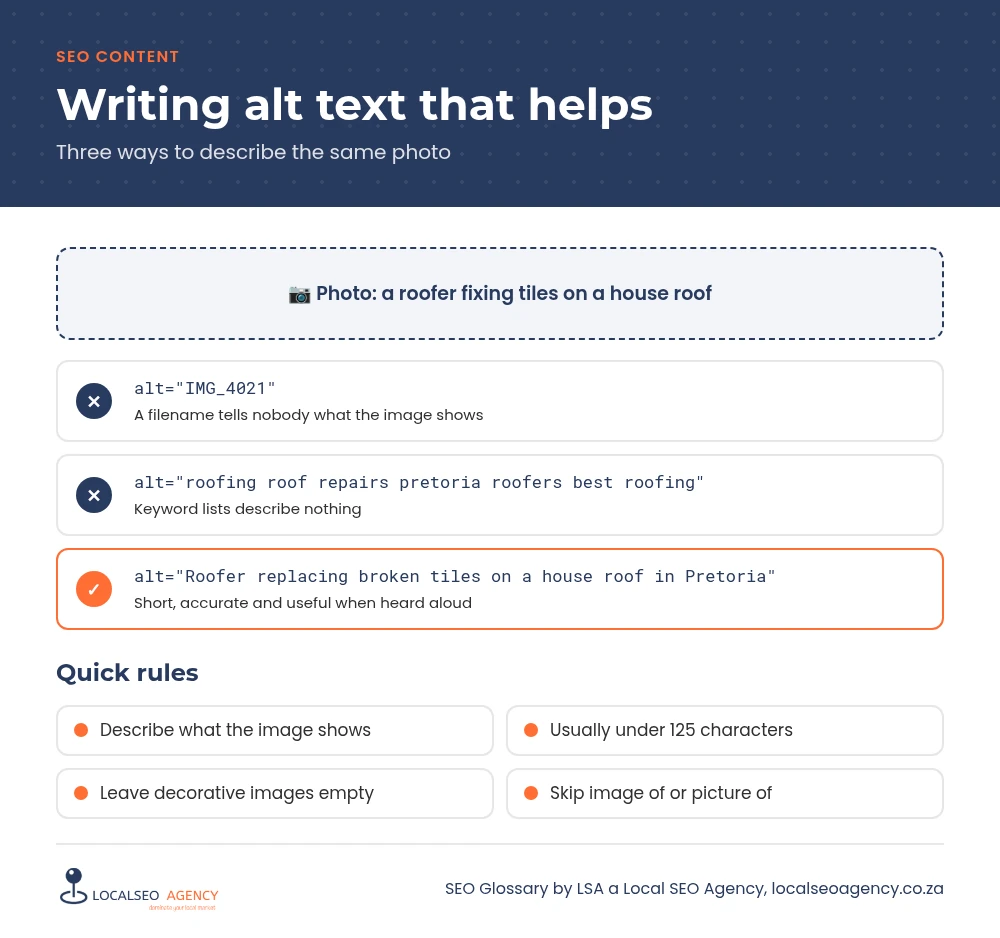
Describe what the image shows and why it is on the page, in a short phrase or sentence. Imagine describing the picture to someone on the phone. Mention the place or service where it is genuinely part of the picture, such as completed roof repair on a house in Pretoria, but write for the listener first.
Keep it concise, usually under 125 characters, since some screen readers cut longer text. Do not start with image of or picture of, because screen readers already announce it as an image. For charts and infographics, summarise the main point in the alt text and make sure the key information also appears in the page text.
Purely decorative images, such as background shapes or dividers, should have an empty alt attribute so screen readers skip them. Logos should be described by the business name, and images used as links should describe where the link goes.
Common alt text mistakes
- Filenames such as IMG_4021 or banner-final left as the description.
- Lists of keywords that describe nothing in the image.
- Reusing a single description for every photo in a gallery.
- Long paragraphs that should be in the page copy instead.
- Describing decorative shapes and spacers, which adds noise for screen reader users.
How to fix alt text across a site
Start with the images on your key pages: the homepage, service pages and location pages. Then work through the media library, where WordPress lets you edit the description once for an image. Pair this with image optimisation so each image is also compressed and sized correctly.
How LSA helps
LSA a Local SEO Agency reviews the images on your key pages, writes accurate descriptions and fixes missing or unhelpful ones across the media library. It is part of our on page SEO services.
For the short definition, see Alt Text in our SEO Glossary, alongside the other SEO content terms.
Want pages that bring in enquiries, not just visitors? Call LSA a Local SEO Agency on 068 786 7331 or contact us to talk about your content.