
SEO Glossary: Technical SEO

Some pages on your site should never appear in Google. The noindex tag is the simple, reliable way to keep them out, as long as it is never left on the pages that pay the bills.
What the noindex tag does
Noindex is an instruction that tells search engines not to include a page in their index. It is usually added as a robots meta tag in the page head, for example meta name robots content noindex, or sent as an X-Robots-Tag HTTP header for files such as PDFs. When Google next crawls the page and sees the instruction, it drops the page from search results.
Noindex does not stop visitors reaching the page. It only affects search engines. You can combine it with follow, which lets Google still follow the links on that page.
Which pages should use it
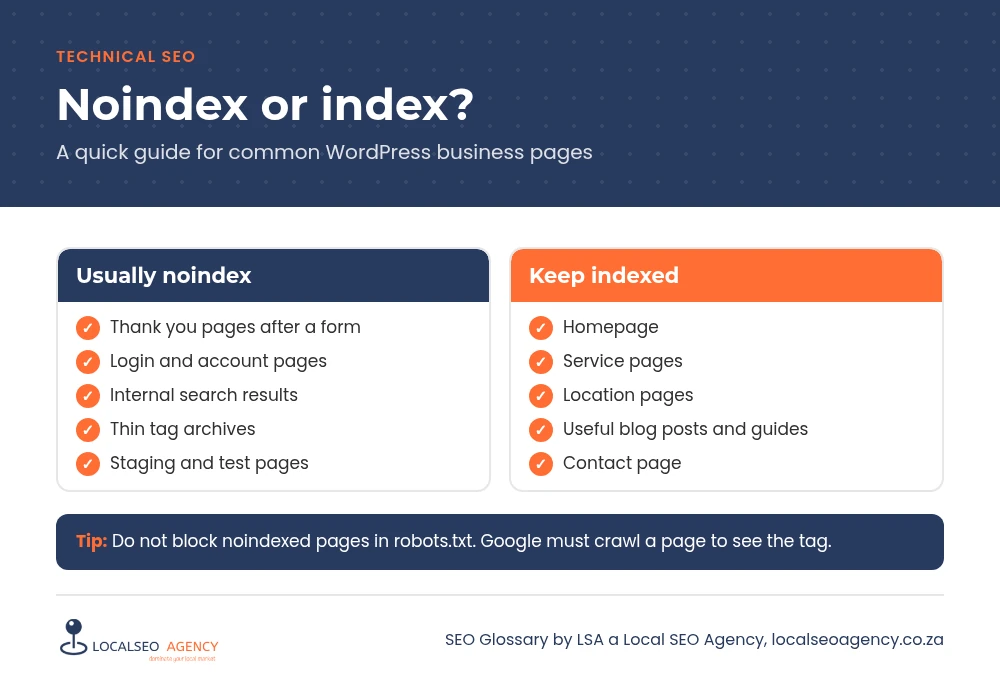
Good candidates are pages that offer no value to someone arriving from Google: thank you pages after a form, login and account pages, internal search results, cart and checkout steps, thin tag archives and staging or test pages. Keeping thank you pages out of search also keeps your enquiry tracking honest, because conversions are not triggered by stray visits from Google.
How it works with other signals
Google must be able to crawl the page
If a page is blocked in robots.txt, Google cannot see its noindex tag, so the page may stay indexed. Allow crawling and let the tag do its job.
Noindex versus canonical
Use noindex when a page should not be in search at all. Use a canonical tag when a page is a duplicate of another page that should rank. Do not use both on the same URL.
Common noindex mistakes
- The WordPress option that discourages search engines left on after launch.
- Service or location pages accidentally set to noindex in the SEO plugin.
- Noindexed pages still listed in the XML sitemap.
- Disallowing a noindexed URL as well, which hides the very instruction you want Google to read.
- Noindexing whole post types, such as all blog posts, by mistake.
How to check your pages
In Google Search Console, the Pages report has a group called Excluded by noindex tag. Open it and read the list carefully: anything that should be earning traffic needs fixing. The URL Inspection tool also shows whether indexing is allowed for a single page. On the page itself, view the source and search for noindex.
In Rank Math, check the global titles and meta settings for each content type as well as the robots meta box on individual pages, because a single setting can apply noindex to hundreds of URLs at once.
How LSA helps
LSA a Local SEO Agency audits every noindex rule on your site and confirms each one is intentional. Through our technical SEO services we make sure the right pages stay hidden and your money pages are open to Google.
For the short definition, see Noindex Tag in our SEO Glossary, alongside the other technical SEO terms.
Want Google to see your site the way your customers do? Call LSA a Local SEO Agency on 068 786 7331 or contact us for a technical check.