
SEO Glossary: Technical SEO
Duplicate content rarely gets a site penalised, but it does make Google's job harder and can leave your best page buried behind its own copies.
What counts as duplicate content
Duplicate content is substantial blocks of content that are identical or very similar across more than one URL, either on your own site or across different sites. It can be technical, where one page is reachable at several addresses, or editorial, where several pages have been written with almost the same words.
Why it causes problems
Google wants to show one version of a piece of content, so it groups duplicates and picks one to rank. That means your other versions are filtered out, links and other signals are split between copies, and Google may choose the version you like least. On sites with many near identical blog posts or city pages, the result is often that none of them ranks well.
Outright penalties are rare and are aimed at deliberate scraping or spam. The real cost is lost visibility.
Typical causes on business websites
Technical duplicates
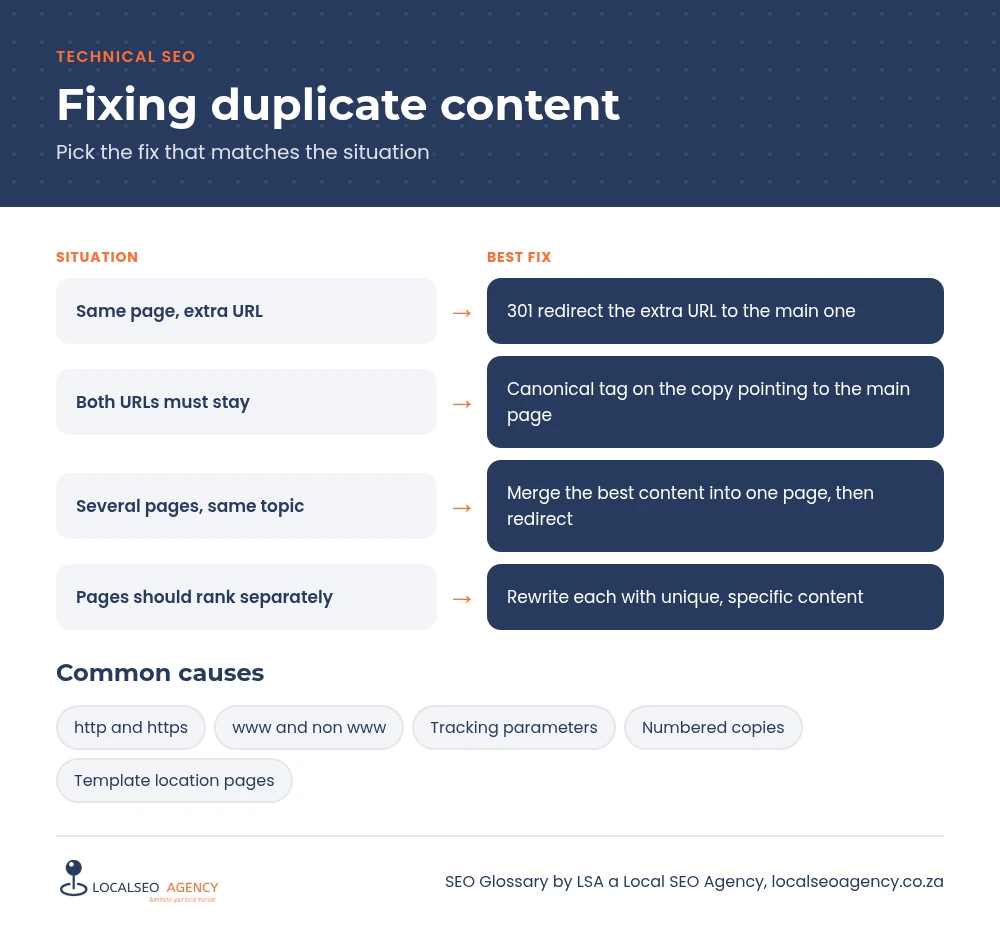
The same page served on http and https, with and without www, with and without a trailing slash, or with tracking parameters attached.
Accidental copies
Pages duplicated in WordPress and published as numbered copies, such as service-page-2, or old drafts that went live alongside the final version.
Template copy
Location pages that swap only the city name, and service descriptions pasted onto several pages or copied from a supplier's website.
Common mistakes when fixing it
- Deleting duplicates without redirecting them, creating 404s for links that pointed there.
- Canonicalising pages that are actually different and should rank separately.
- Rewriting a few words and assuming the page is now unique.
- Keeping several weak pages instead of merging them into one strong page.
How to find and fix duplicates
Search Console's Pages report shows groups such as Duplicate without user selected canonical. A site crawl with a tool that compares page titles and content will surface near duplicates quickly, and a site: search on Google with a distinctive sentence reveals copies elsewhere.
Then choose the right fix. If two URLs are the same page, 301 redirect the extra one. If both must exist, such as a tagged campaign URL, use a canonical tag. If pages target the same topic, merge the best content into one page and redirect the others. If pages should rank separately, rewrite them so each has genuinely different, local detail.
A useful test is to ask what a visitor would lose if one of the duplicate pages disappeared. If the answer is nothing, merge it. If the answer is local detail they genuinely need, such as directions, area specific services or photos of work done in that town, keep the page and make that detail the heart of it.
How LSA helps
LSA a Local SEO Agency has a structured process for finding duplicate and near duplicate pages, choosing the keeper and redirecting the rest without losing links. Our technical SEO services pair that with content rewrites where pages need to stay separate.
For the short definition, see Duplicate Content in our SEO Glossary, alongside the other technical SEO terms.
Need this fixed properly? Call LSA a Local SEO Agency on 068 786 7331 or contact us today.