
SEO Glossary: Backlink Building

NAP is shorthand for name, address and phone. Keeping NAP consistent simply means no listing contradicts another: your website, your Google Business Profile and every directory agree.
Why consistency matters
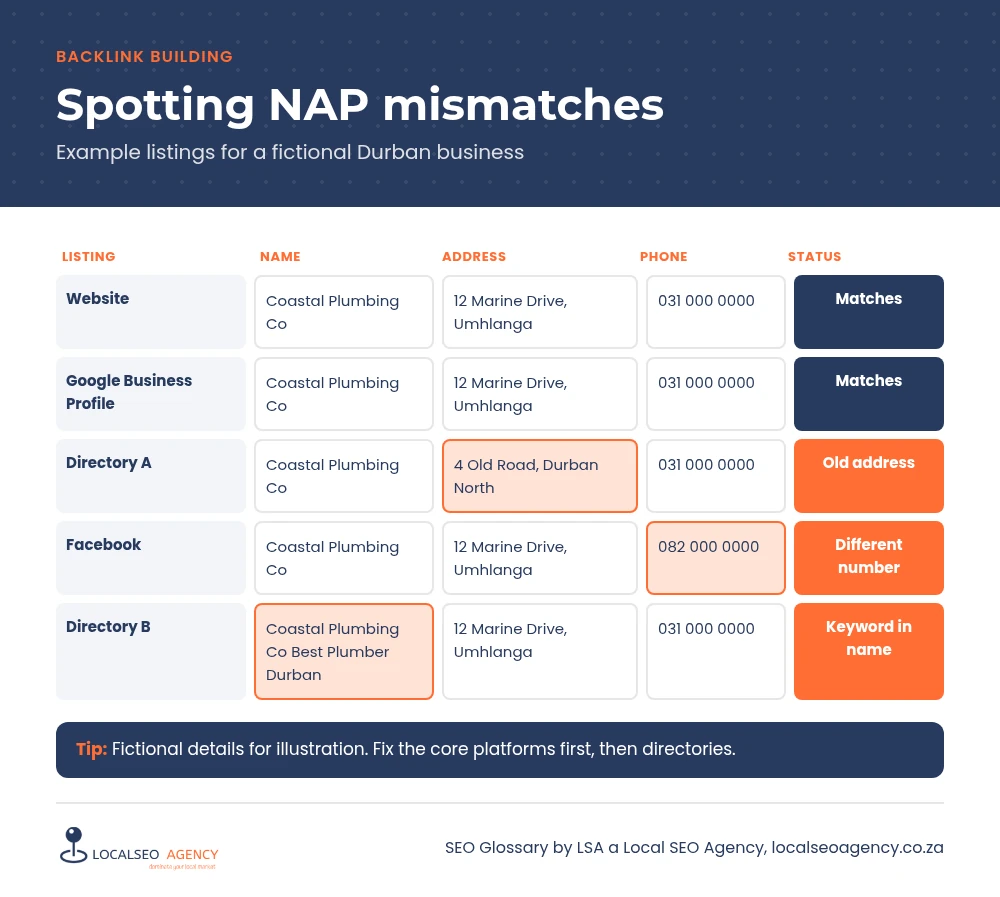
When details match across many sources, search engines can connect them confidently to one business. When they conflict, with an old address on one directory, a different number on another and a slightly different name elsewhere, the picture becomes less clear. Conflicting details also cost you customers directly. Someone who calls an old number or drives to a previous address may simply choose a competitor.
What counts as a mismatch
Name
Use your real trading name as it appears on your signage. Adding keywords or locations that are not part of the name is against Google Business Profile guidelines and creates inconsistency.
Address
Pick one format and stick to it, including unit numbers, street name and suburb. Small formatting differences such as St and Street are usually understood, but a different suburb or an old address is a real problem.
Phone
Use one main number. A local landline and a mobile on different listings can confuse both customers and search engines.
Website and hours
Strictly these are not part of NAP, but the same rule applies. Point every listing to the same version of your URL and keep hours current, including public holidays.
Common NAP mistakes
- Moving premises and updating only the website and Google profile.
- Listing a call tracking number in some places and the main number in others.
- Different staff creating listings with different spellings.
- Duplicate listings left over from a previous owner or agency.
- A footer address on the website that differs from the contact page.
How to audit and fix NAP
Write down your correct details exactly as they should appear. Then search for your business name, your old and current phone numbers and your previous addresses to find listings. Record each one with the details shown and whether you can edit it. Fix the most important platforms first: your website, Google Business Profile, Apple Maps, Bing Places, Facebook and the main directories. Claim or remove duplicates where the platform allows.
After any change, such as a move, a new number or a rebrand, repeat the check. A short checklist saved with your business records makes it routine. For a full look at the wider listing picture, see local citations.
Make one person responsible for listings. Most inconsistencies creep in when several people, or several agencies over the years, have each created or edited profiles without a shared record of the correct details.
Schema markup on your website can also state your details in a structured way, which helps search engines read them correctly. LocalBusiness markup with your name, address, phone and opening hours gives search engines a clean reference copy that matches what your visitors see on the page.
How LSA helps
LSA a Local SEO Agency audits your business details across the web, fixes mismatches and duplicates, and keeps a record so future changes are simple. Our guide to building local citations explains the process.
For the short definition, see NAP Consistency in our SEO Glossary, alongside the other backlink building terms.
Not sure what your current links are doing for you? Call LSA a Local SEO Agency on 068 786 7331 or contact us and we will review them with you.