
SEO Glossary: Technical SEO
Every website has some 404 errors. A few are harmless. The ones that matter are broken links on your own pages and missing URLs that other sites still link to.
What a 404 error is
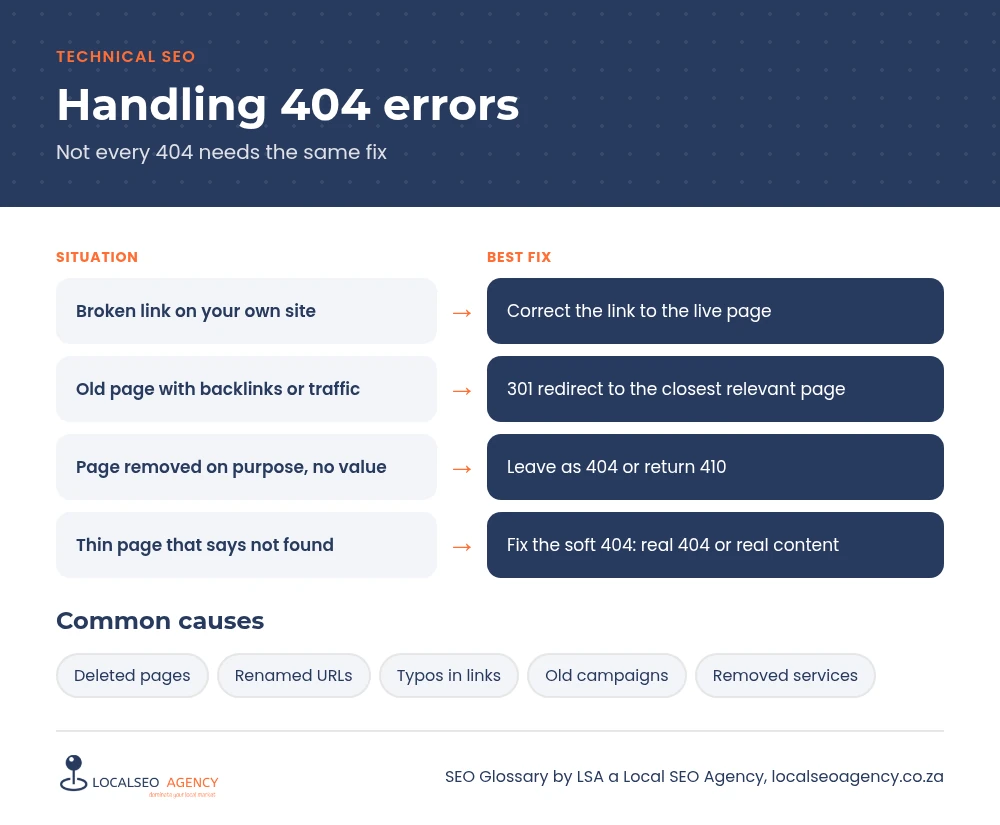
A 404 is the HTTP status code a server returns when the requested URL does not exist. Visitors see a page not found message, and search engines learn that there is nothing to index at that address. A related code, 410 gone, says the page was removed on purpose and is not coming back.
404s are a normal part of the web. Google has said that having them does not harm the rest of your site. Problems arise when the missing pages are ones people or links are still trying to reach.
Why it matters for your business
A visitor who clicks a link in your menu or a blog post and lands on an error page is likely to leave, and that might be a lost enquiry. If a page that used to rank and earn backlinks now returns 404, the value of those links is wasted. And if Google repeatedly finds broken internal links, it spends crawl effort on dead ends instead of on your live pages.
Types of 404 problems
Broken internal links
Links on your own site pointing to pages that were deleted or renamed. These are always worth fixing.
Lost pages with backlinks
Old URLs that other websites still link to. These deserve a 301 redirect to the closest relevant page.
Soft 404s
Pages that return 200 but show little or no content, or say not found. Google treats them as errors, and they should return a real 404 or be filled with real content.
Common mistakes
- Redirecting every 404 to the homepage, which Google often treats as a soft 404.
- Deleting pages without checking whether they have backlinks.
- A bare default error page with no menu, search or contact options.
- Panicking about 404s for URLs that never existed, such as spam or typo URLs.
How to find and fix them
In Google Search Console, open the Pages report and look at Not found (404) and Soft 404. Sort the list by importance: pages with backlinks, pages that had traffic and URLs linked from your own site. A site crawl finds every broken internal link and the page it sits on, so you can correct the link at the source.
Give your 404 page a helpful design with your menu, a search box, links to your main services and your phone number, so a lost visitor still has a way forward.
How LSA helps
LSA a Local SEO Agency finds broken links and lost pages, redirects those with value and fixes links at the source. We also help design a 404 page that keeps visitors on the site. For Gauteng businesses, see our Johannesburg SEO agency page.
For the short definition, see 404 Error in our SEO Glossary, alongside the other technical SEO terms.
Need this fixed properly? Call LSA a Local SEO Agency on 068 786 7331 or contact us today.