
SEO Glossary: SEO Content
If you serve more than one city or town, a location page for each one gives Google a clear page to show when someone searches for your service in that area. Done properly, it is one of the strongest pages on a local business site.
What a location page is
A location page targets a service in a specific place, for example SEO company Cape Town or electrician Potchefstroom. It tells searchers and Google that you genuinely work in that area and explains what that looks like in practice: which suburbs you cover, how quickly you can be there, and whether there is an office or a team based nearby.
Location pages work alongside your service pages. The service page explains the offer in detail. The location page shows how that offer is delivered in one area and links back to the full service description.
Why location pages matter
Searches that include a place name, or that Google treats as local, are often the most valuable searches a small business can win, because the person is looking for someone nearby to hire. Without a page that clearly matches the area, your site has to rely on a general page that rarely ranks well for a specific city.
What to put on each location page
Local detail that is true
Areas and suburbs served, travel or response times, local office details where they exist, and work you have actually done in the area. This is what makes each page different.
Consistent business details
Use the same business name, phone number and address details as your Google Business Profile, so every signal points in the same direction.
Local questions
Municipal rules, regional weather, typical property types or other factors that genuinely change how the service works in that place.
Links in both directions
Point readers to the matching offer, and make sure the menu leads to every area you cover.
Common location page mistakes
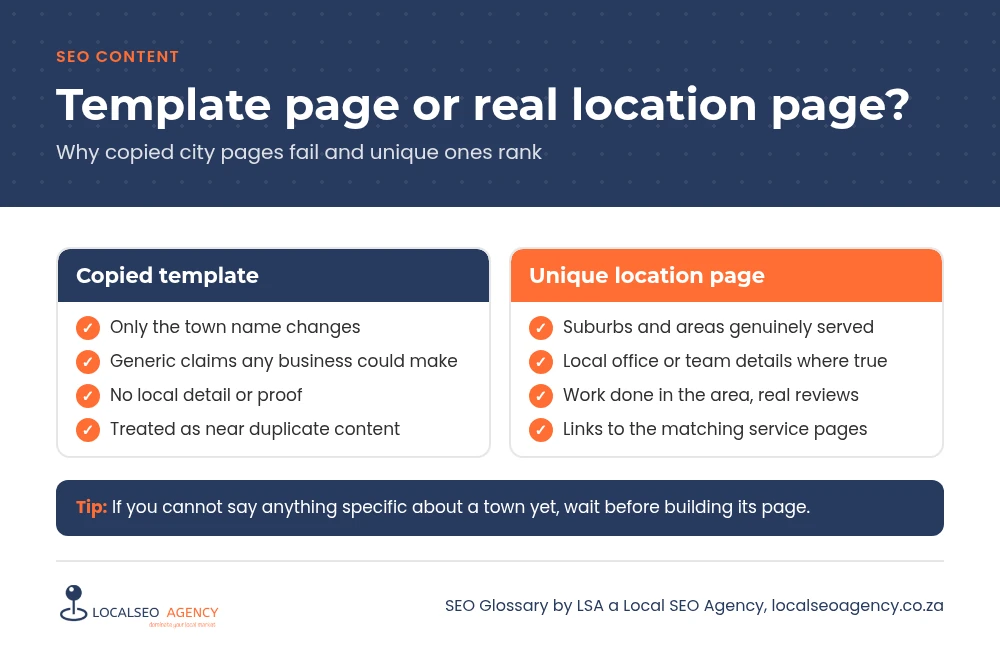
- One template copied for twenty towns with only the town name swapped.
- Pages for places you do not actually serve, which damages trust when customers call.
- Listing an address where you have no real office or staff.
- City pages that are not linked from anywhere, so Google rarely finds them.
- A phone number or business name that differs from the Google Business Profile.
How to build location pages that work
Start with the areas that already produce work and the ones you want to grow. Write each page from scratch with details a local customer would recognise. If you cannot say anything specific about a town, it is better not to have a page for it yet, because near identical pages are treated as duplicate content and rarely rank.
Fewer, stronger pages beat a long list of weak ones. Add a new city page when you can genuinely serve that area and have something useful to say about it, then review results every few months.
How LSA helps
LSA a Local SEO Agency writes location pages that read as if a local person wrote them, because they are built from real information about how you work in each area. Our own Cape Town SEO page is one example of how we structure them.
For the short definition, see Location Pages in our SEO Glossary, alongside the other SEO content terms.
Need this written or rewritten properly? Call LSA a Local SEO Agency on 068 786 7331 or contact us today.