
SEO Glossary: Technical SEO
Modern websites lean on JavaScript for menus, sliders, tabs and whole page layouts. Google can handle most of it, but not all, and the gaps can hide content you are counting on.
What JavaScript SEO is
JavaScript SEO is the practice of making sure search engines can crawl, render and index content and links that rely on JavaScript. On a traditional page, the server sends ready made HTML. On a script heavy page, the browser has to run code to build parts of the page, and search engines must do the same before they can see that content.
How Google handles JavaScript
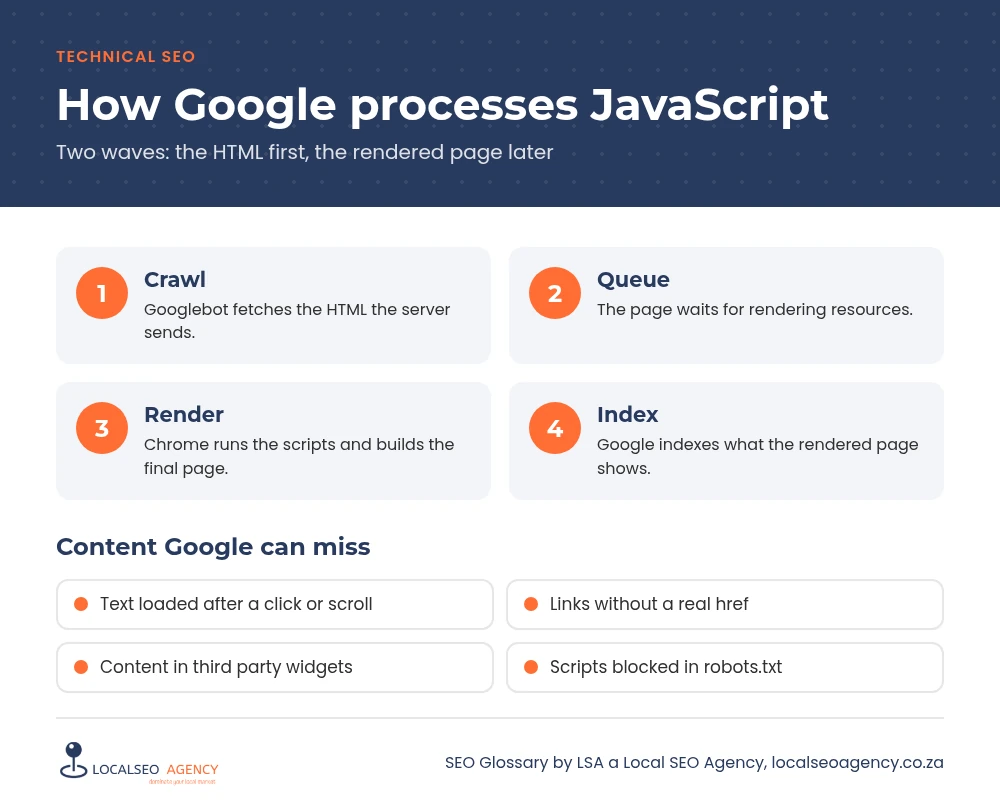
Googlebot first fetches the HTML, then queues the page for rendering in an up to date version of Chrome, where scripts run and the final page is built. Most of the time this works well. But rendering takes extra resources, it can be delayed, and Googlebot does not click buttons, scroll endlessly or fill in forms. Content that only appears after those actions may never be seen. See our crawling guide for the steps before rendering.
Why it matters for business sites
WordPress sites built with Elementor and similar builders are mostly served as HTML, which is good news. The risk sits in the extras: reviews loaded by a third party widget, location details in a map script, menus that build their links with JavaScript, tabs that fetch content only when opened, and popups. Heavy scripts also slow pages down and hurt responsiveness on mid range phones.
Common JavaScript SEO problems
- Links built as buttons or click handlers instead of normal anchor tags with an href.
- Content loaded only after a click, scroll or swipe.
- Important text inside third party widgets or iframes.
- Robots rules that stop Google fetching the files it needs to build the page.
- Titles, canonicals or noindex changed by scripts after the page loads.
How to check and fix it
Use the live test in the URL Inspection tool and view the rendered HTML and screenshot. Search the rendered code for your key text and links. Compare it with the page source in your browser. If important content is missing, move it into the main HTML, render it on the server or make it part of the page by default rather than on interaction.
Make every navigational link a real anchor element with an href. Keep critical SEO tags in the original HTML. Finally, cut scripts you do not need, which helps speed as well as indexing.
Third party tools
Review widgets, booking tools and live chat are useful, but their content usually belongs to the provider and loads from their servers. If reviews or service details matter for SEO, show a selection directly in the page text as well, and keep the widget as a bonus for visitors.
How LSA helps
LSA a Local SEO Agency compares what visitors see with what Googlebot renders and fixes the gaps. It is a regular part of our technical SEO services, and it ties closely to mobile first indexing.
For the short definition, see JavaScript SEO in our SEO Glossary, alongside the other technical SEO terms.
Not sure where your site stands? Call LSA a Local SEO Agency on 068 786 7331 or contact us and we will take a look.